Home
Tutorials
Code structure - Important!
An important info about the structure of the code.
The code is divided in two sections: open access and by subscription
The first part of the code for this section is located both in landscape_designer
part of an archive
Note that in addition to landscape_designer, the archive includes some additional folders,
like maps and worlds, that are used by all projects
and therefore are located outside of them. An archive has proper directory structure, so all you have to do
is expanding it.
Also note that currently the ROS2 Humble is used. However, older sections of this tutorial
still use Galactic and maybe some older versions. I will fix it in future.
For installation instructions, see Installation.
As for the second part: the tutorial is divided in two parts, too. First part is about
the theory, it is complete and free (see below).
The code itself however has either free access, or by subscription, like some utilities that
live in "utils_commercial" folder. When you try to access these utilities, you will be asked to
log in.
Additionally, Kalman part of that code is moved to a by-subscription section as well:
kalman_nav.zip.
Note: This archive should be added to same folder where you have unpacked
archive.
Let me explain how Kalman code works and why do you need commercial code if free code works
just fine.
A kalman.py file was moved to by-subscription section and therefore will not be
available unless you get it and copy it over to nav25d_06/nav25d_06 (or later) folder.
The (free) Navigation.py file checks if this file is
present and either uses it (in which case you will get a complete Kalman based
localization) or not (in which case Kalman filter is replaced with a rather
primitive simulation).
As the result, in a Gazebo simulator, all future demos will work even without
by-subscription files. But of course, in a real world your robot will not have
these localization abilities.
Important note: as I write more sections, the kalman_nav.zip file will
get additional context. Once purchased, it gives you 1 year of access, so when,
for example, I add support for aruco markers in Gazebo (available already) or make the
navigation to respect the fact that the world is round, or whatever else related
to localization - it will go to this archive and will be available with the
same subscription. Unless this project is terminated, of course.
As for utilities that are available from by-subscription section, they do not affect simulation,
but give you tools to design the world, control robot in a simulation and provide some other
nice-to-have features.
An important info about the structure of the code.
The code is divided in two sections: open access and by subscription
The first part of the code for this section is located both in landscape_designer part of an archive Note that in addition to landscape_designer, the archive includes some additional folders, like maps and worlds, that are used by all projects and therefore are located outside of them. An archive has proper directory structure, so all you have to do is expanding it.
Also note that currently the ROS2 Humble is used. However, older sections of this tutorial still use Galactic and maybe some older versions. I will fix it in future.
For installation instructions, see Installation.
As for the second part: the tutorial is divided in two parts, too. First part is about the theory, it is complete and free (see below).
The code itself however has either free access, or by subscription, like some utilities that live in "utils_commercial" folder. When you try to access these utilities, you will be asked to log in.
Additionally, Kalman part of that code is moved to a by-subscription section as well:
kalman_nav.zip.
Note: This archive should be added to same folder where you have unpacked
archive.
Let me explain how Kalman code works and why do you need commercial code if free code works just fine.
A kalman.py file was moved to by-subscription section and therefore will not be available unless you get it and copy it over to nav25d_06/nav25d_06 (or later) folder. The (free) Navigation.py file checks if this file is present and either uses it (in which case you will get a complete Kalman based localization) or not (in which case Kalman filter is replaced with a rather primitive simulation).
As the result, in a Gazebo simulator, all future demos will work even without by-subscription files. But of course, in a real world your robot will not have these localization abilities.
Important note: as I write more sections, the kalman_nav.zip file will get additional context. Once purchased, it gives you 1 year of access, so when, for example, I add support for aruco markers in Gazebo (available already) or make the navigation to respect the fact that the world is round, or whatever else related to localization - it will go to this archive and will be available with the same subscription. Unless this project is terminated, of course.
As for utilities that are available from by-subscription section, they do not affect simulation, but give you tools to design the world, control robot in a simulation and provide some other nice-to-have features.
Introduction
Download link: landscape_designer.zip.
Note: This archive should be added to same folder where you have unpacked
archive.
When running Gazebo simulations, you need a 2.5 d world, with realistic landscape, textures that can be used both by a human (so it looks nice) and by a robot (say, as source of landmarks for optical flow localization algorithms).
Also, our robot should be able to use the roads graph that we have created in earlier chapters. This provides a challenge: drawing roads by hand is not an easy task, so we need an algorithm to make the road follow the landscape, and to connect roads mesh to the landscape in a watertight manner.
It would be nice to be able to "paint" the landscape with textures, to load topo maps from disk and build landscape based on it, to adjust "hills" and "walleys" manually...
The Landscape Designer utility does all that.
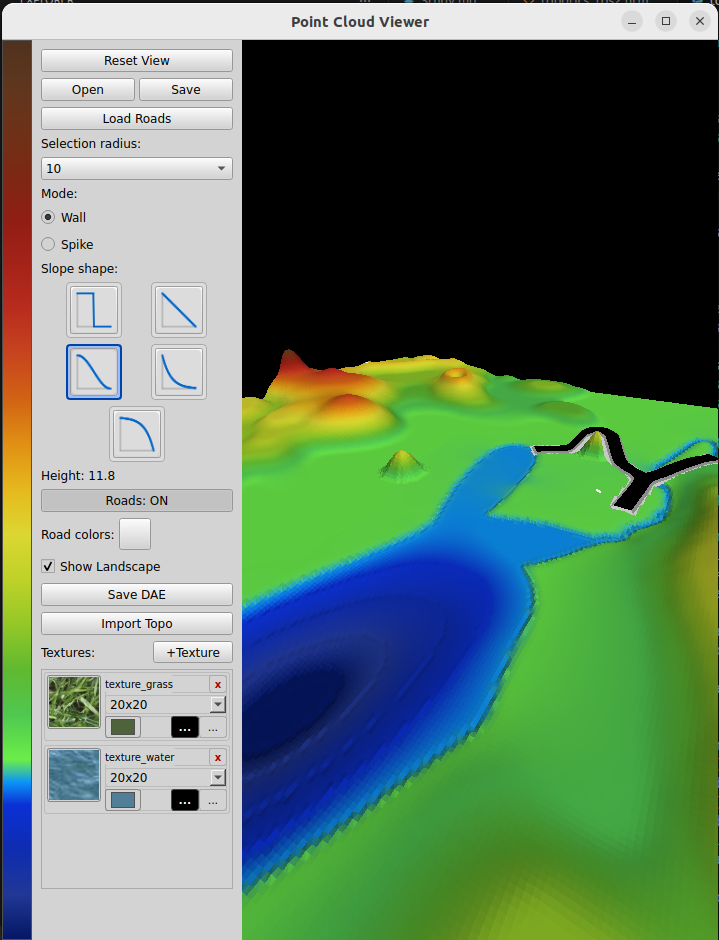
It allows the user to load road networks thet were exported from the map_editor utility:

You can add "hills" and "valleys" to the landscape, adjust the terrain elevation:

Textures can be "painted" into the landscape:

User can export the result as DAE, and use it in simulators, like Gazebo.
